

















Apex Components, a supplier to Nova Industries, delivered phone batteries, but two were damaged and must be returned. Nova Industries needs to reduce what it owes the supplier without changing or deleting the original Purchase Invoice.
A Debit Note records that supplier return or credit as a separate return Purchase Invoice. It reverses the relevant payable, tax, expense, and stock effects while preserving the original transaction.
Use a Debit Note when goods are returned to a supplier, a supplier invoice must be reduced, or a supplier credit must be recorded against an earlier Purchase Invoice.
Before you begin
You need a submitted Purchase Invoice. Confirm:
- which Items and quantities are being returned;
- whether ERPNext must also reverse stock;
- whether a linked Purchase Receipt exists;
- whether the Supplier has already been paid;
- the posting date on which the return should affect the ledgers.
If you are correcting only the price while keeping the goods, follow Debit Note for price adjustment.
Create a Debit Note
- Open the submitted Purchase Invoice that must be reduced.
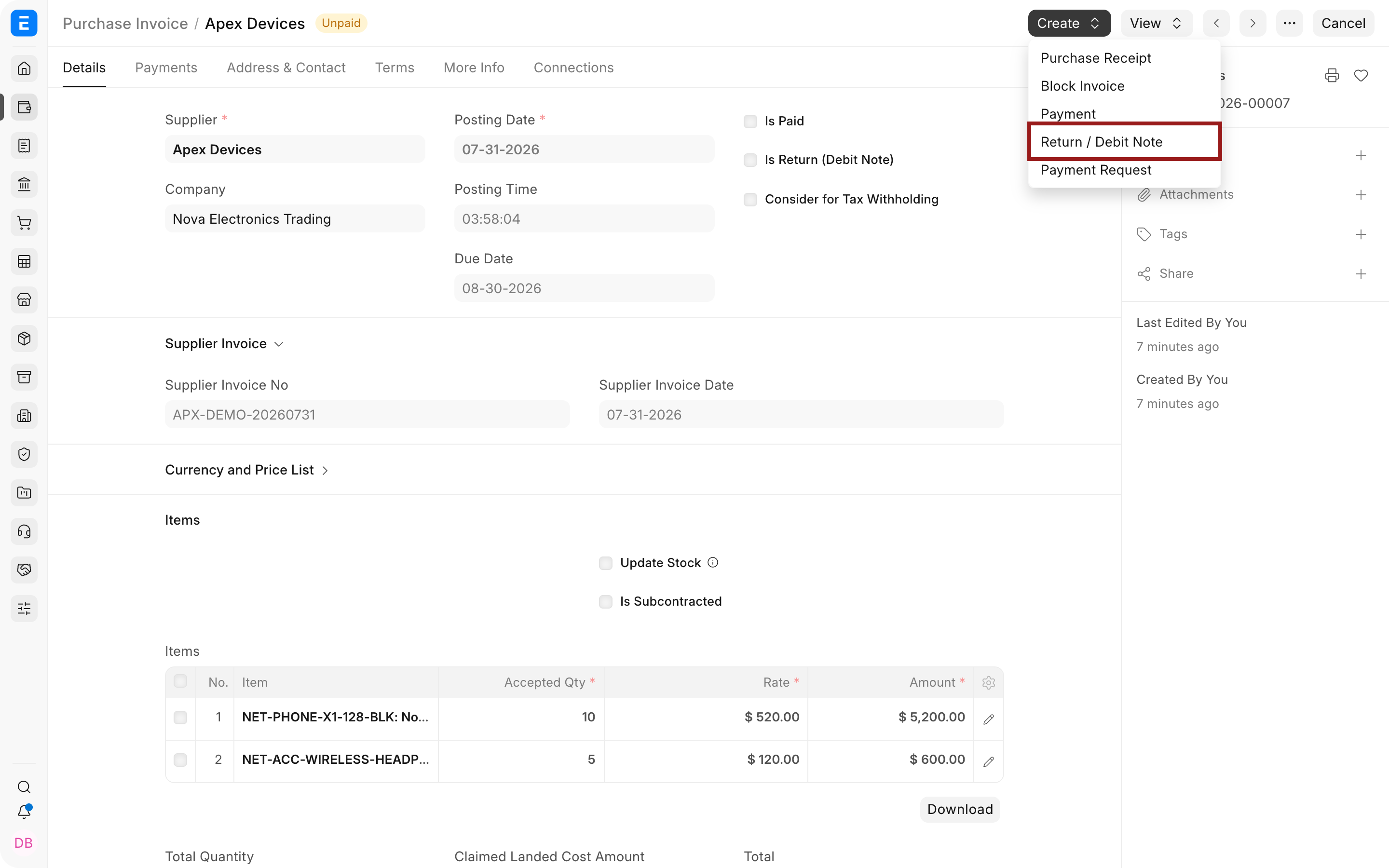
- Select Create > Return / Debit Note.
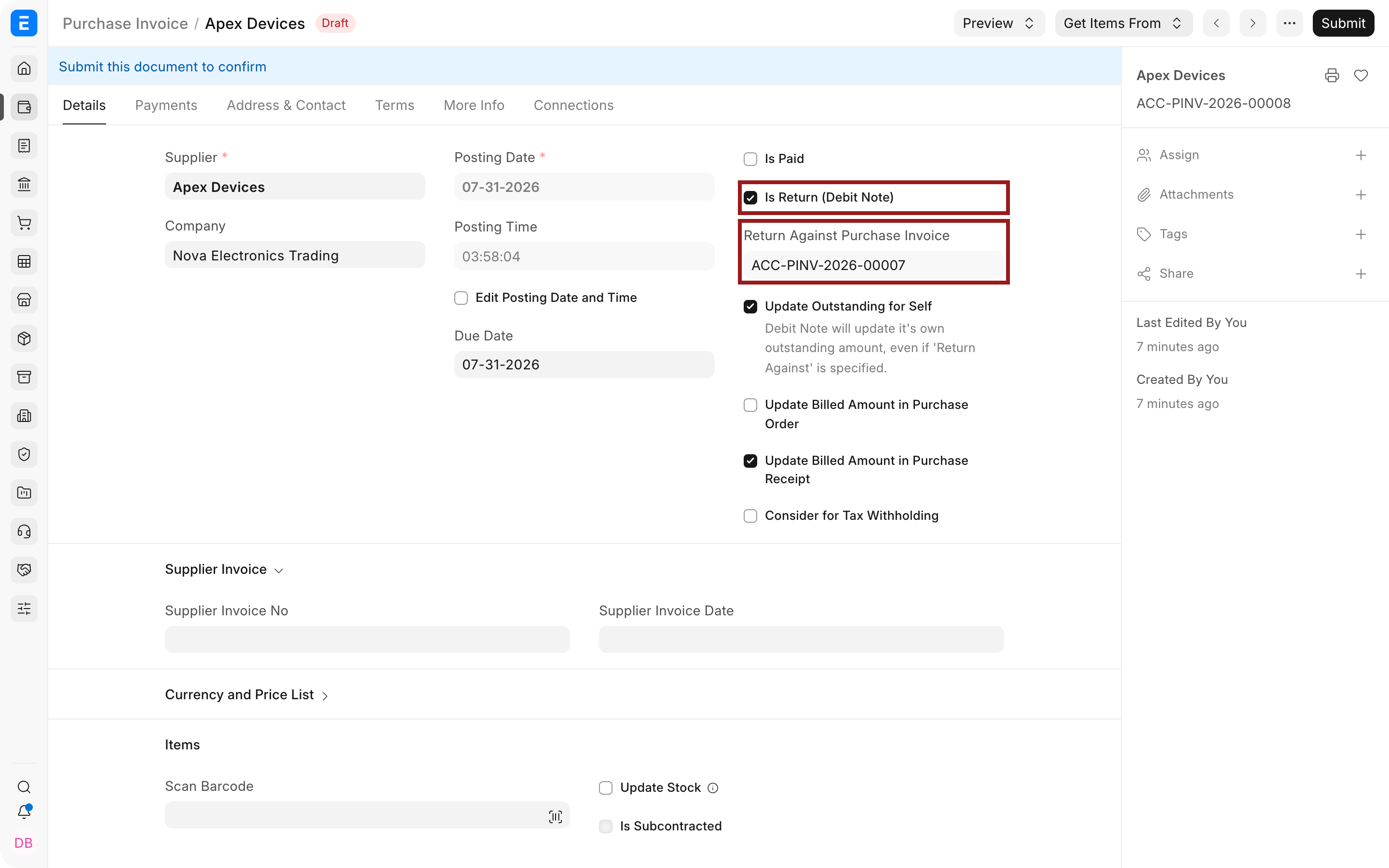
- ERPNext creates a new Purchase Invoice with Is Return (Debit Note) selected and Return Against Purchase Invoice linked to the original invoice. Verify both fields before changing the Items.
- Keep only the Items being returned. Remove unaffected rows.
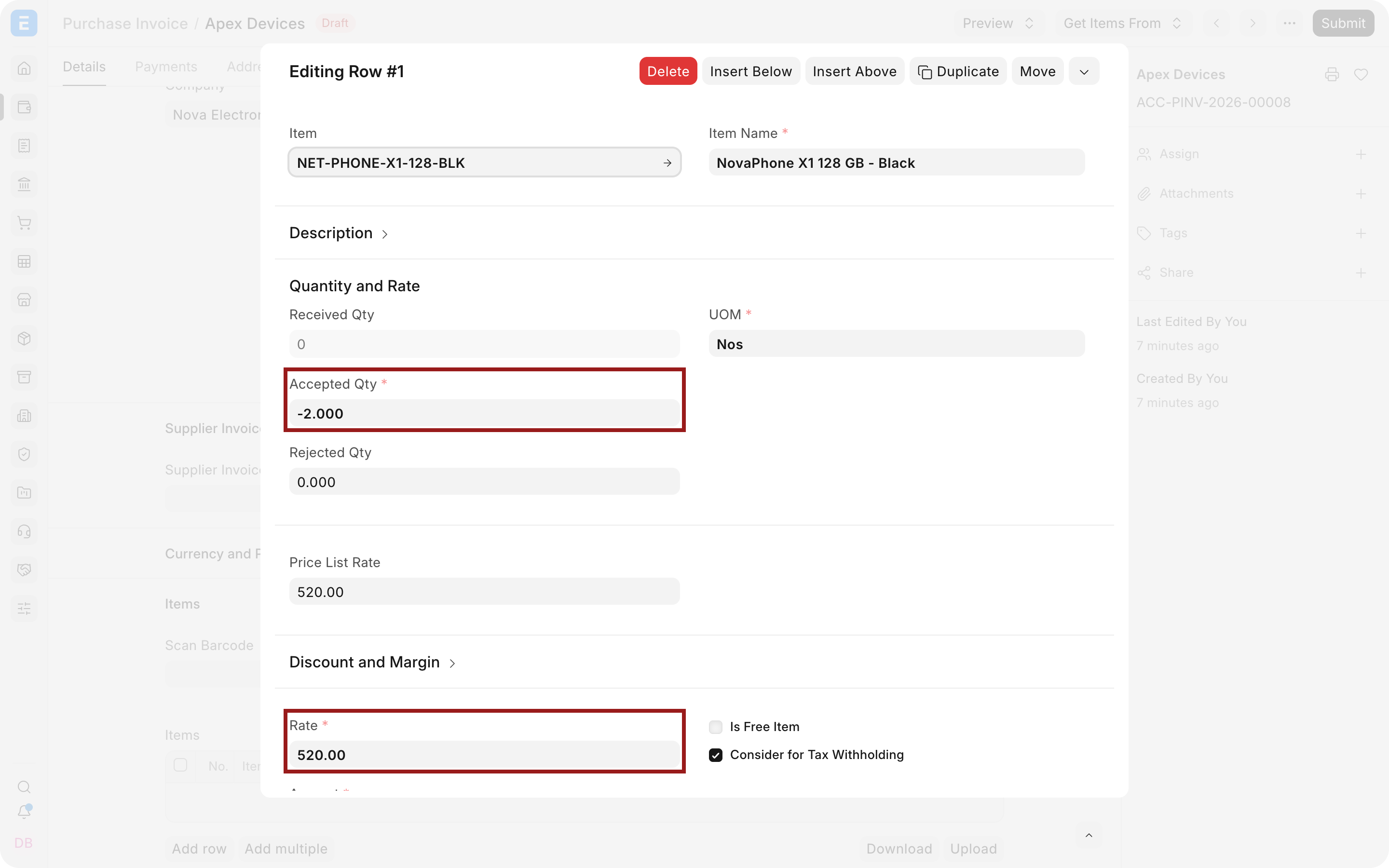
- Enter the return quantity as a negative number. For example, use
-2to return two units from an original quantity of ten. - Select the pencil icon on the Item row to open the full row editor. Verify the returned quantity, original rate, Warehouse, expense account, Cost Center, and source-document references.
- If the return must move stock out, select Update Stock and verify the Warehouse. Leave it clear when stock was already returned through a Purchase Return against the Purchase Receipt.
- Review taxes and totals. A return should have negative amounts.
- Save and submit the Debit Note.
What the Debit Note updates
On submission, ERPNext reduces the Supplier payable and reverses the relevant expense, asset, tax, or receipt-clearing values. When Update Stock is selected, it also posts the stock movement out of the selected Warehouse.
The original Purchase Invoice remains submitted. Its outstanding amount is reduced by the Debit Note. This maintains a clear audit trail instead of rewriting the original bill.
If the Supplier invoice was unpaid, the Debit Note reduces the amount to pay. If the Supplier was already paid, the result may be a Supplier credit that can be allocated against another invoice or settled through a payment. Use Payment Reconciliation when allocations need correction.
Important fields and what they mean
| Field | What it controls |
|---|---|
| Is Return (Debit Note) | Marks the Purchase Invoice as a return and changes amounts to reversal values. |
| Return Against Purchase Invoice | Links the Debit Note to the original invoice and supports outstanding and document-status updates. |
| Update Outstanding for Self | Updates the Debit Note's own outstanding amount even when it references an original invoice. Use the default unless your accounting process requires otherwise. |
| Update Billed Amount in Purchase Order | Reduces the billed amount on the linked Purchase Order when applicable. |
| Update Billed Amount in Purchase Receipt | Reduces the billed amount on the linked Purchase Receipt when applicable. |
| Update Stock | Posts the physical purchase return from the Warehouse through this document. |
| Items | Identifies what is returned. Quantities and amounts are normally negative. |
| Posting Date and Time | Determines the accounting and optional stock period for the return. |
| Credit To | The Supplier payable account affected by the Debit Note. |
Partial returns
You can return selected Items or only part of an Item quantity. Retain the original rate unless the Debit Note is specifically a price adjustment. ERPNext limits the return against the quantities and amounts available on the referenced document.
Example: an invoice contains ten phones at $520 each. If two damaged phones are returned, enter quantity -2 at rate $520. The Debit Note total is $1,040 before tax, and the original payable is reduced by that amount.
Submit and next steps
After submission:
- check the original invoice's outstanding amount;
- review the Supplier balance in Accounts Payable;
- inspect the General Ledger entries from View > Accounting Ledger;
- inspect the Stock Ledger when Update Stock was enabled;
- allocate any remaining Supplier credit to a later Purchase Invoice or payment.
Status
| Status | Meaning |
|---|---|
| Draft | The Debit Note has not affected ledgers. |
| Return | The return Purchase Invoice is submitted. |
| Unpaid | The submitted Debit Note has an outstanding credit that is not allocated. |
| Paid | The Debit Note has been fully allocated or settled. |
| Canceled | Its accounting and stock effect has been reversed under ERPNext cancellation rules. |
Troubleshooting
The return quantity is rejected
Confirm that the quantity is negative, does not exceed the remaining returnable quantity, and references the correct original Item row.
Stock is reversed twice
Use either a stock-updating Debit Note or a Purchase Return against the Purchase Receipt for the same physical movement. Do not post both for the same returned units.
The original invoice outstanding amount did not change as expected
Check Return Against Purchase Invoice, the update-outstanding option, existing payments, and reconciliations. Then review the Payment Ledger entries for both documents.
The Supplier was already paid
The Debit Note creates a Supplier credit. Reconcile it against a later invoice or record the appropriate refund payment according to your process.
Frequently asked questions
Can I create a Debit Note without an original Purchase Invoice?
ERPNext can support an unlinked return in some configurations, but linking the original invoice gives better quantity validation, outstanding updates, and audit evidence. Prefer the linked workflow.
Can a Debit Note return only one line?
You can. Remove all unaffected rows and retain only the returned line and quantity.
Does every Debit Note update stock?
It does not. Stock changes only when the document is configured to update stock. A price-only adjustment should not move stock.