


















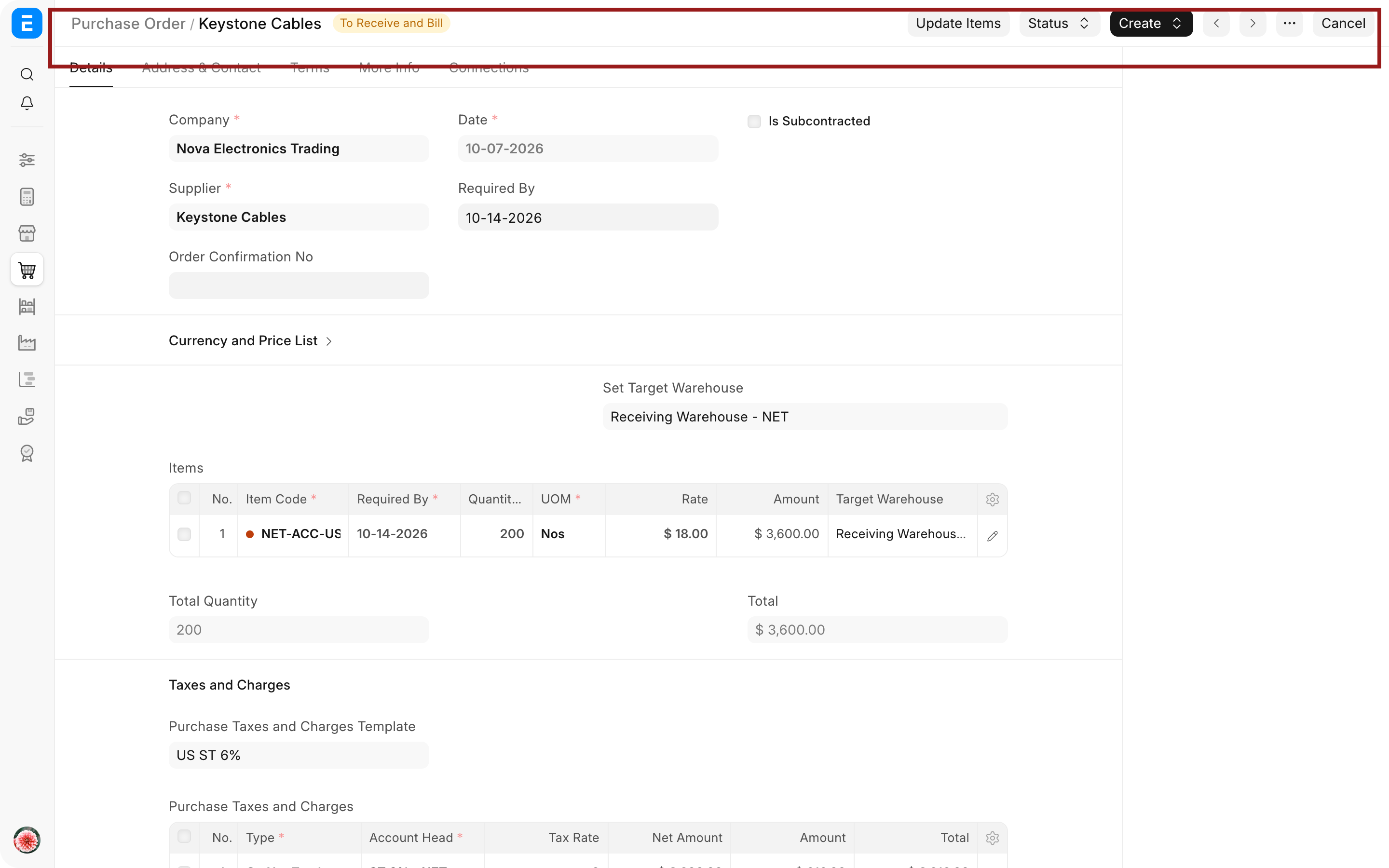
Imagine you work in Nova Industries' warehouse. The buying team ordered 200 USB-C adapters from Keystone Cables, but an order alone does not prove that the goods arrived. When the delivery reaches the loading bay, you count 200 units, accept 195, and keep 5 damaged units separately. ERPNext needs one document that records that physical event accurately.
A Purchase Receipt records the quantity that actually arrived and the warehouses where accepted and rejected goods were placed. Submitting it updates stock and the received quantity on the linked Purchase Order. It does not, by itself, create the supplier's payable. That happens when you submit the Purchase Invoice.
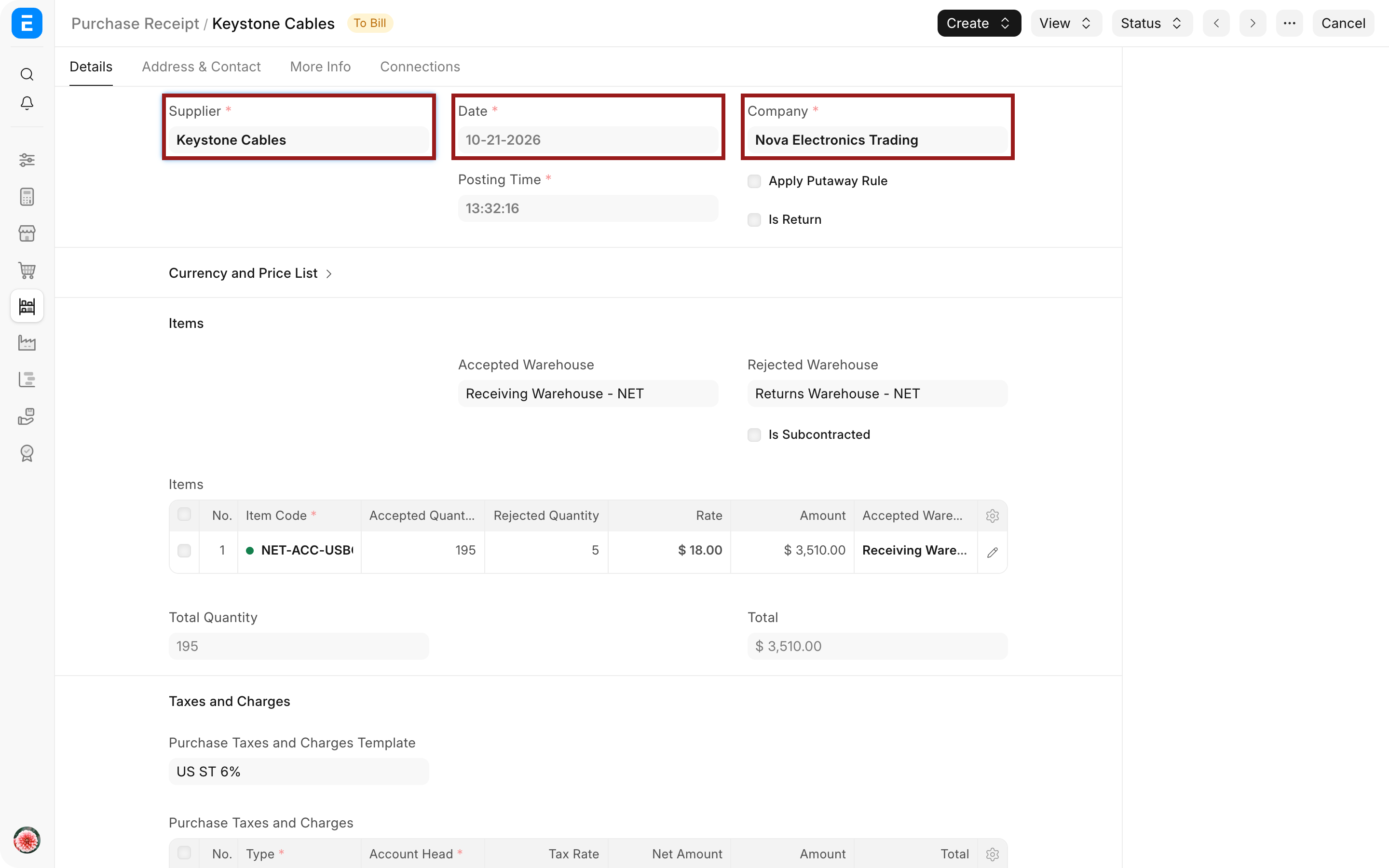
Understand where Purchase Receipt fits
| Document | What it represents | Stock effect | Accounting effect |
|---|---|---|---|
| Purchase Order | Nova's commitment to buy | None | None |
| Purchase Receipt | Goods physically received | Accepted and rejected stock is recorded | With perpetual inventory, stock and Stock Received But Not Billed are updated |
| Purchase Invoice | Supplier's bill | None unless Update Stock is enabled | Creates the supplier payable and related expense or stock entries |
| Payment Entry | Money paid to the supplier | None | Reduces the supplier payable and bank or cash |
You can create a Purchase Receipt from a submitted Purchase Order or create it independently when Buying Settings does not require a Purchase Order. Using the source order is safer because ERPNext carries the supplier, items, quantities, rates, taxes, warehouses, and references forward.
Before you begin
Create the Supplier, stock Items, and receiving warehouses. Confirm that every stock Item has a stock UOM and valuation method. If inspection is mandatory, configure the Item for incoming Quality Inspection before receiving it.
When you expect rejected goods, create a separate non-group warehouse such as Returns Warehouse. Keeping rejected stock separate prevents damaged units from appearing as usable stock.
Create a Purchase Receipt from a Purchase Order
- Open the submitted Purchase Order.
- Select Create > Purchase Receipt.
- Check the Supplier, Company, posting date, and supplier delivery note.
- Set the Accepted Warehouse and, when needed, the Rejected Warehouse.
- Review every item row and record the accepted and rejected quantities.
- Check rates, taxes, valuation charges, serial numbers, batches, and Quality Inspection references.
- Save the draft, review the totals, and submit it.
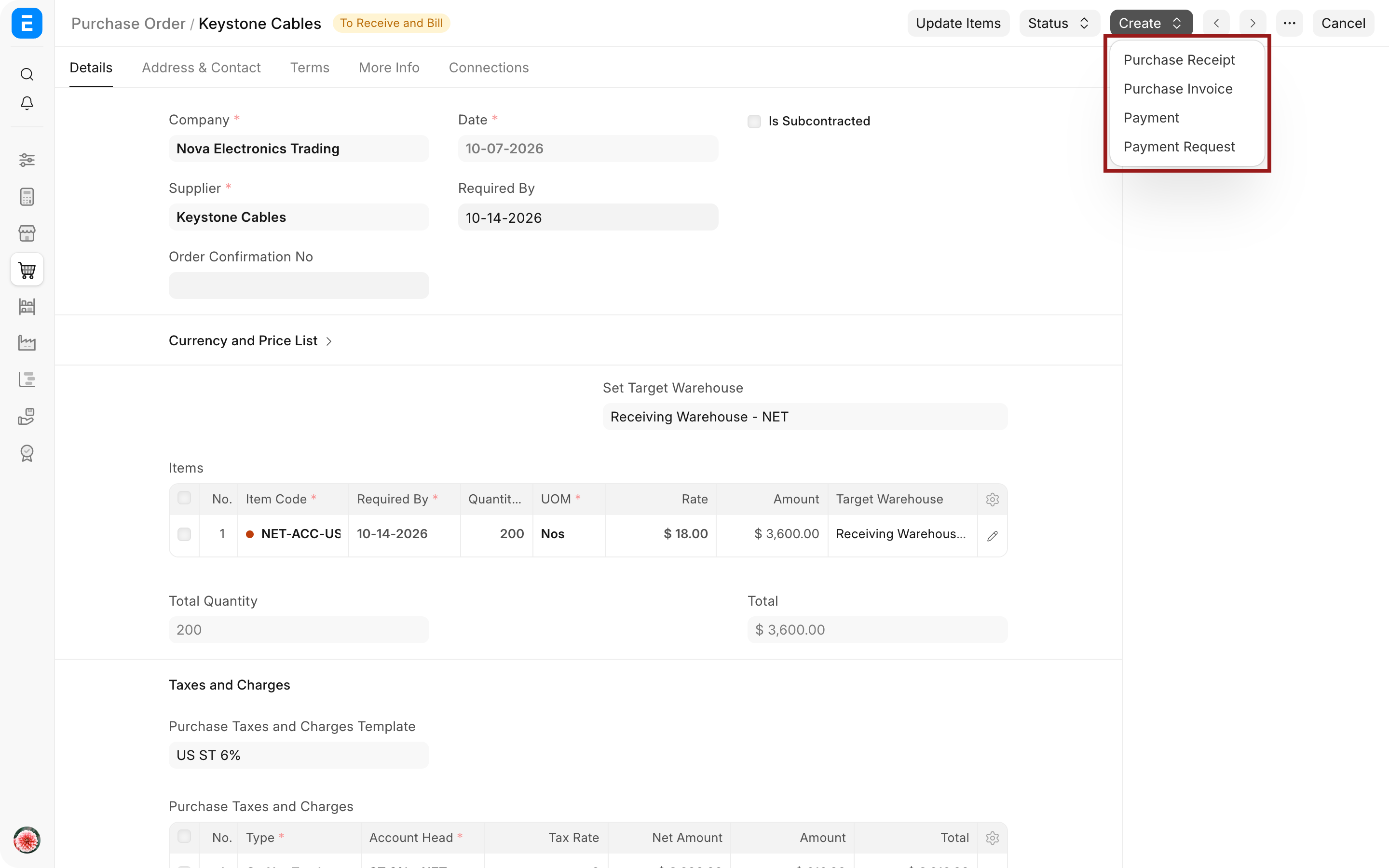
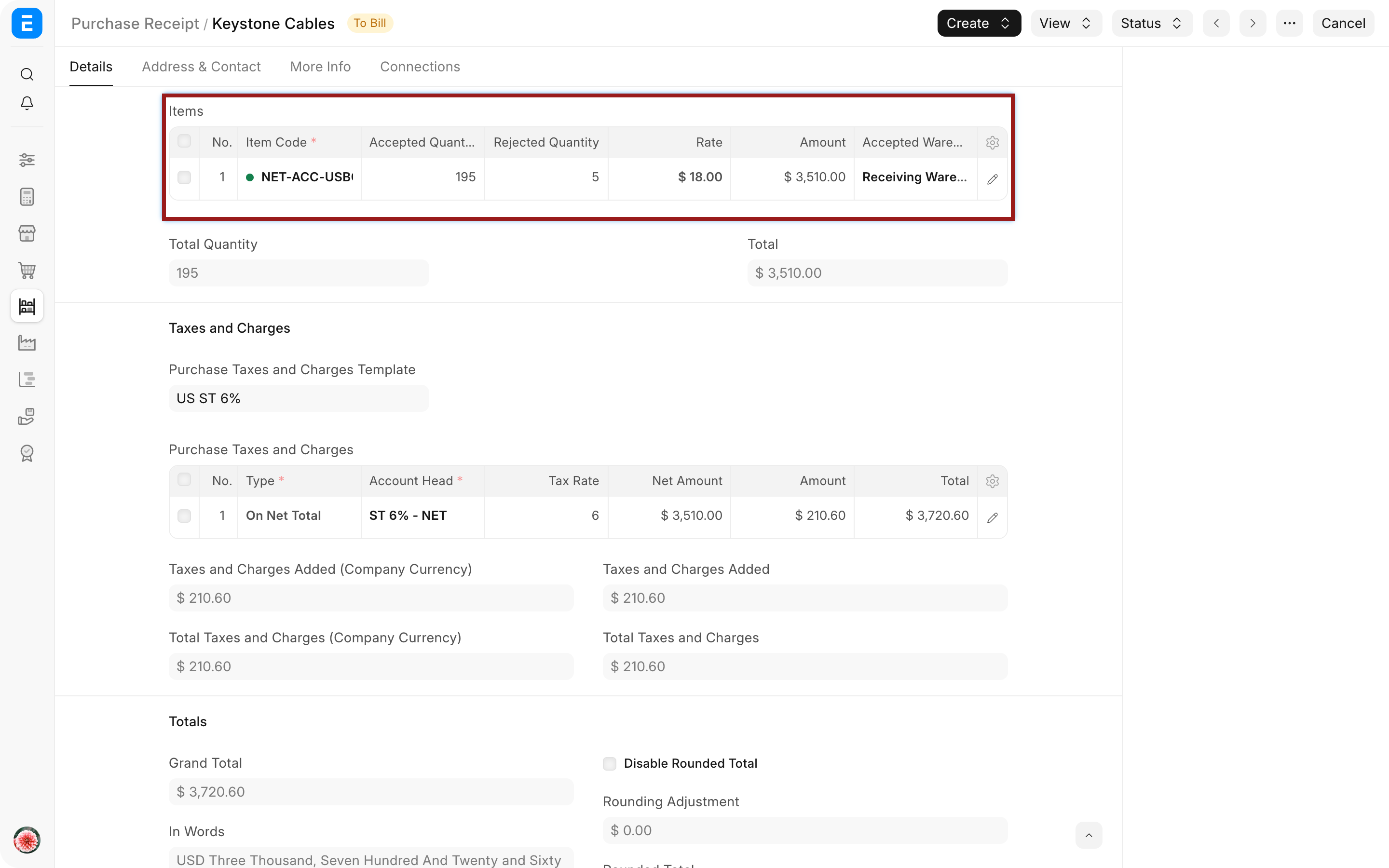
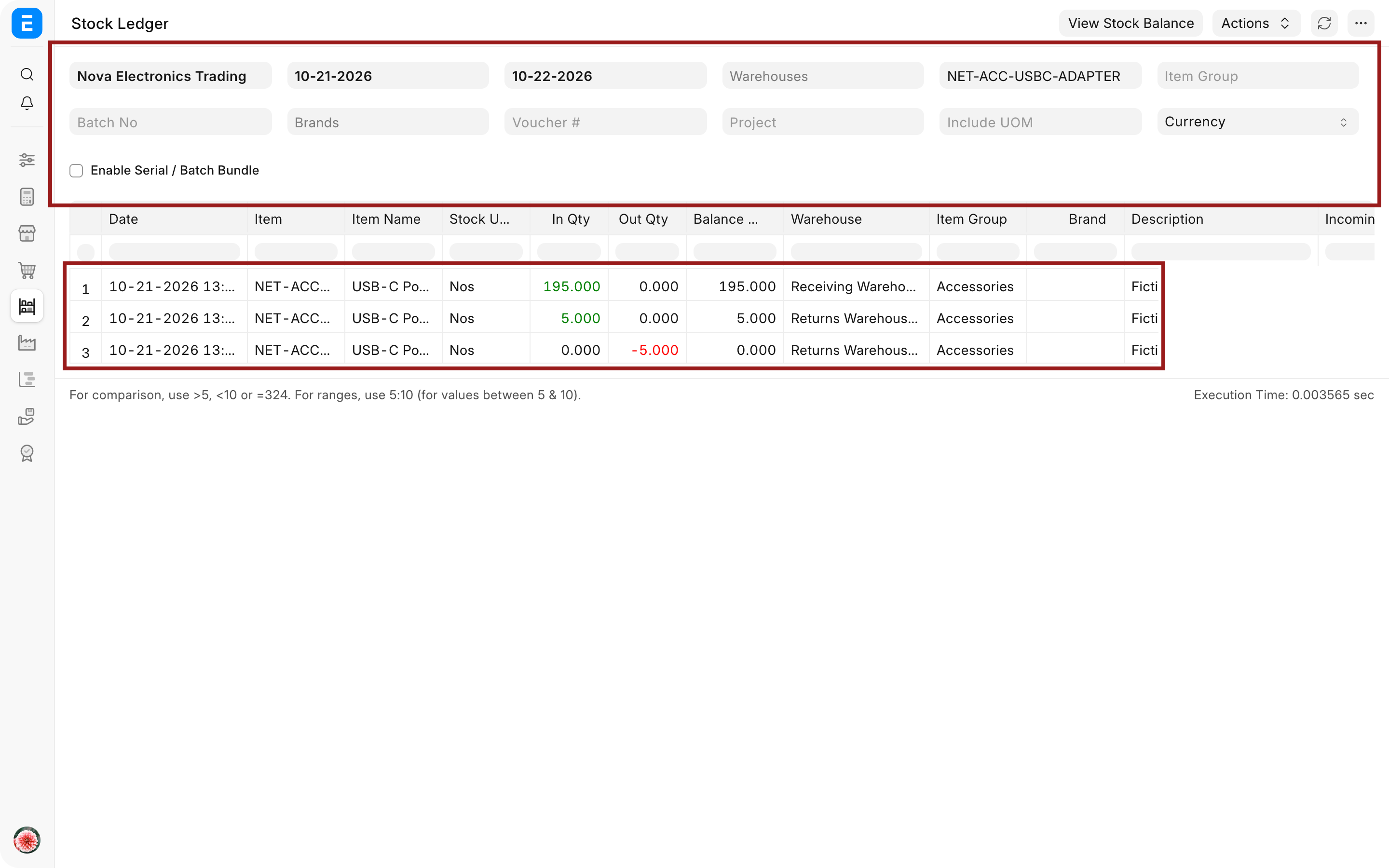
In the Nova example, the delivery contains 200 adapters. The warehouse accepts 195 into Receiving Warehouse and places 5 damaged units in Returns Warehouse. The accepted quantity contributes to the document total; the rejected quantity is still tracked in stock, but it is kept outside the usable warehouse.
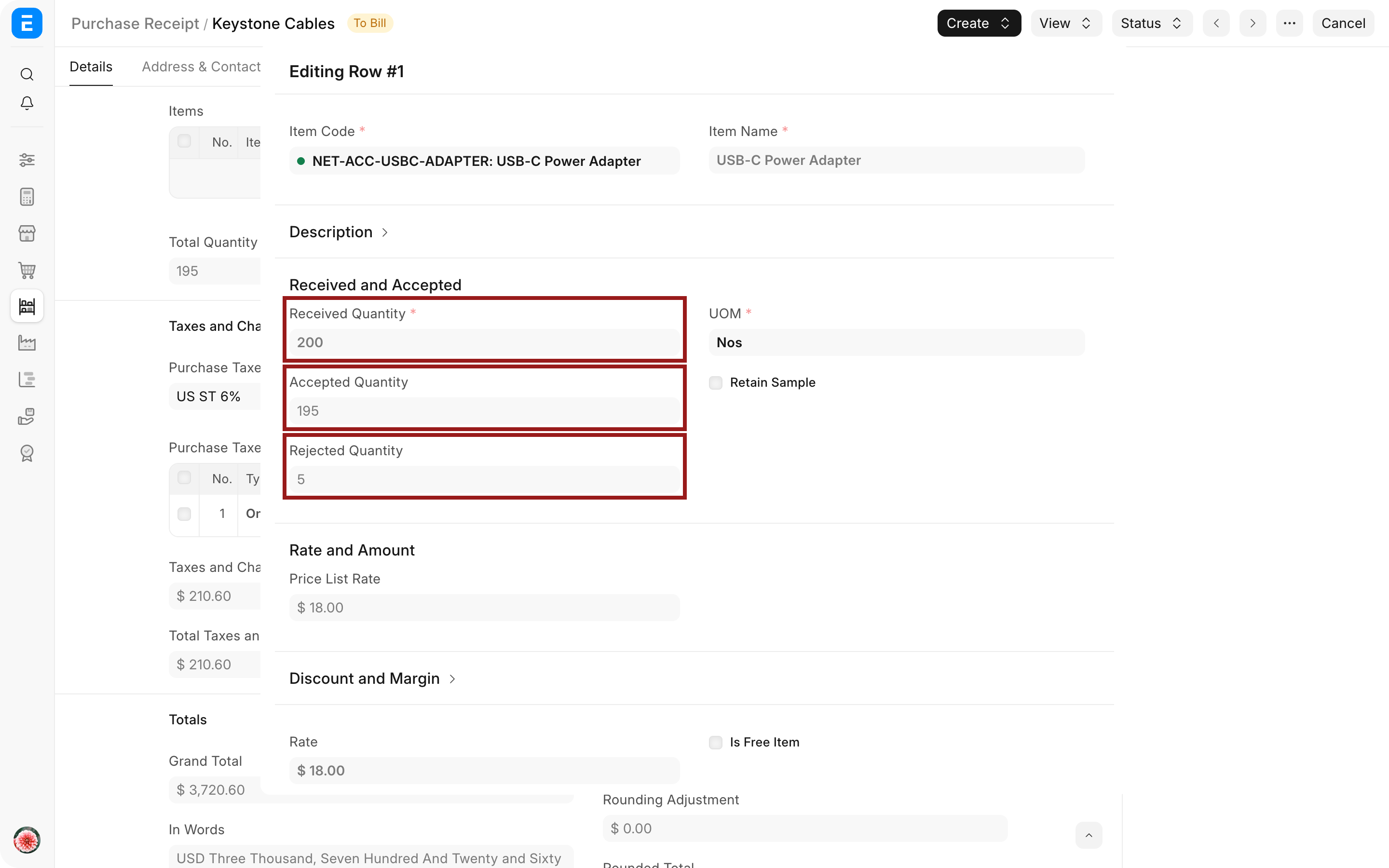
Open an item row when you need to review the purchase UOM, conversion factor, rate, warehouses, source order, serial or batch details, Quality Inspection, expense account, and other row-level controls.
Important fields and what they mean
| Field | What it controls | Example |
|---|---|---|
| Supplier | The party that delivered the goods | Keystone Cables |
| Supplier Delivery Note | The supplier's dispatch or delivery reference | The number printed on the delivery paperwork |
| Posting Date and Time | When the stock movement is recorded | The actual receipt time |
| Accepted Warehouse | Where usable stock is stored | Receiving Warehouse |
| Rejected Warehouse | Where damaged or failed stock is isolated | Returns Warehouse |
| Accepted Quantity | Quantity added to usable stock and valued on the receipt | 195 adapters |
| Rejected Quantity | Quantity recorded in the rejected warehouse | 5 adapters |
| Purchase Order | The source commitment being fulfilled | The order placed with Keystone Cables |
| Quality Inspection | Evidence that the incoming item passed or failed inspection | Required for inspection-controlled Items |
| UOM Conversion Factor | Converts the purchase UOM to the stock UOM | 10 boxes of 20 become 200 Nos |
Receive goods without a Purchase Order
Create a new Purchase Receipt and choose the Supplier, Items, quantities, rates, and warehouses directly. This is useful for approved direct purchases, but it removes the order-level comparison and approval trail.
If direct receipts are not part of your policy, enable Purchase Order Required in Buying Settings. Supplier-level exceptions can support utilities, emergency purchases, or other controlled cases without weakening the rule for everyone.
Record quality inspection, serial numbers, and batches
When an Item requires incoming inspection, link the relevant Quality Inspection before submission. ERPNext prevents submission when the Item requires inspection and the reference is missing.
For serialized Items, enter the accepted and rejected serial numbers in the correct fields. For batch-controlled Items, select or create the batch as required. The accepted and rejected identifiers must match their quantities.
Use Retain Sample when your quality process keeps a sample aside. The retained quantity is controlled separately from the quantity made available for normal use.
Handle taxes and valuation charges
Taxes and charges copied from the Purchase Order should be reviewed against the supplier's delivery and your accounting policy. A charge can affect the supplier-facing total, inventory valuation, or both.
Use Allocate Full Amount to Stock Items when an actual charge should increase inventory value without increasing the tax-bearing purchase amount. Use a Landed Cost Voucher when freight, duty, insurance, or clearing charges become known after receipt.
Do not use a valuation charge merely to make the document total match paperwork. Confirm whether the amount belongs in inventory cost, the supplier payable, or a separate expense.
Review other useful controls
| Control | When it matters |
|---|---|
| Currency, price list, and conversion rate | Review these when the Purchase Order is in a foreign currency or prices come from a supplier-specific price list. The stock value must still be converted to the Company currency. |
| Additional Discount | Use it only when the commercial discount genuinely applies to the receipt. Check how it changes the net total and valuation. |
| Barcode and Scan Barcode | Use barcode scanning to add or identify Items at the receiving desk, then verify the resulting Item and quantity before submission. |
| Raw Materials Consumed | Use the consumed-items section for applicable subcontracting receipts. Fetch and verify the stock supplied to the subcontractor rather than treating it as ordinary purchased stock. |
| Letterhead, Print Heading, and Group Same Items | Use these print controls when the warehouse or supplier needs a formal receipt copy. They change presentation, not the Stock Ledger effect. |
The receipt can also carry the supplier's delivery reference and your organization's notes. These references help the warehouse, buyer, and finance team match the same physical delivery without relying on an ERPNext record code in normal communication.
What happens after submission
ERPNext posts a Stock Ledger Entry for the accepted quantity in the accepted warehouse and for the rejected quantity in the rejected warehouse. The linked Purchase Order's received quantity and percentage are updated.
With perpetual inventory enabled, ERPNext also keeps the warehouse value in sync with the General Ledger. A typical receipt debits Stock In Hand and credits Stock Received But Not Billed for the accepted stock value. The later Purchase Invoice clears Stock Received But Not Billed and creates the supplier payable.
The submitted receipt normally shows To Bill until its accepted quantity is covered by a Purchase Invoice. From the receipt, you can create a Purchase Invoice, Purchase Return, Stock Entry, or retaining-sample entry when applicable.
Handle partial and short receipts
One Purchase Order can be received through several Purchase Receipts. If Nova receives 120 units today and 80 next week, create separate receipts. ERPNext keeps the order open for the remaining quantity.
Use Close only when the remaining order quantity will never be received or billed. Closing the receipt or order does not reverse stock already posted. Use a Purchase Return when goods must leave the warehouse.
Troubleshooting
ERPNext asks for a Purchase Order
Buying Settings or the Supplier's transaction controls require a Purchase Order. Create the receipt from a submitted order or use a documented Supplier exception if direct receipt is intentionally allowed.
The received quantity is higher than the order quantity
Check the item row, purchase UOM, stock UOM, and conversion factor. Buying Settings may permit a controlled over-receipt percentage, but ERPNext blocks quantities beyond that allowance.
The receipt cannot be submitted without Quality Inspection
The Item requires incoming inspection. Create or link a submitted Quality Inspection with the correct Item, Supplier, reference, and sample result.
Rejected goods appear in usable stock
Confirm that a separate Rejected Warehouse is selected in the item row. Moving rejected goods into the accepted warehouse makes stock reports treat them as available inventory.
The Purchase Order still shows quantity pending
Open the receipt item details and confirm the Purchase Order and Purchase Order Item references. A manually added row without the source reference does not fulfil the order line.
Frequently asked questions
Does Purchase Receipt create the supplier payable?
Purchase Receipt does not create the supplier payable. It records the physical receipt. The Purchase Invoice creates the supplier payable. With perpetual inventory, the receipt can still post interim stock accounting through Stock Received But Not Billed.
Can rejected quantity be returned later?
Rejected quantity can be returned later. Keep it in the rejected warehouse, then create a Purchase Return from the submitted receipt. Select the rejected warehouse as the source for the returned quantity.
Can I skip Purchase Receipt for services?
Purchase Receipt can usually be skipped for a pure service because there is no stock movement. The service is ordered and then billed directly through a Purchase Invoice. Your Buying Settings and approval policy decide whether the Purchase Order is required.
Can I change the posting date?
Enable Edit Posting Date and Time before submission. Backdated stock entries are subject to immutable-ledger and stock-closing rules, so use the actual receipt time and correct mistakes through supported cancellation or reversal workflows.
What if freight becomes known after receipt?
Use a Landed Cost Voucher to allocate the later charge to the received Items. This updates inventory valuation without rewriting the original receipt.
Trace the requirement through Material Request, Supplier Quotation, and Purchase Order. After receipt, use Purchase Invoice for the payable, Purchase Return for rejected goods, Landed Cost Voucher for later attributable costs, Stock Ledger for quantity and value, Serial Number and Batch for traceability, and Buying Settings for receipt controls.