


















Website Route Meta
Arbitrary meta tags can be added in your web pages using Website Route Meta.
Meta Tags are invisible tags that provide data about your page to search engines
and website visitors. When used correctly, these tags may help boost your SEO
and rankings on popular search engines. These tags will be placed in the
`` section of your page. ERPNext allows you add arbitrary meta tags in
your web pages to improve the SEO of your pages.
To access Website Route Meta go to:
Home > Website > Web Site > Website Route Meta
1. How to add meta tags to a web page
- Go to the Website Route Meta list and click on New.
- Enter the route. Make sure the route doesn't start with a slash (
/). A Web
Page for this route should exist. - Add key value pairs for each meta tag. For e.g., to add keywords to your web
page, enter "keywords" as the Key and add comma separated keywords in the
Value column. - Click on Save.
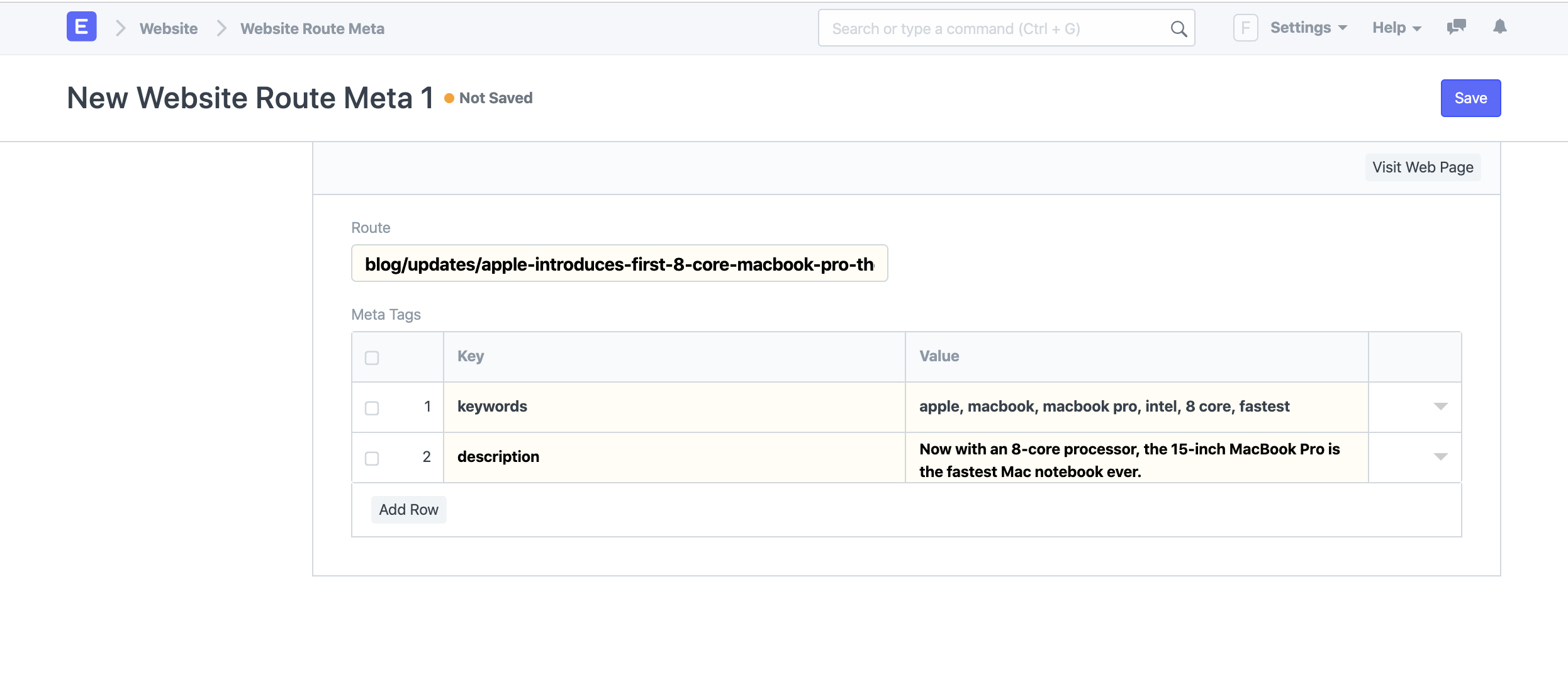 New Website Route Meta
Now if you check the page source of your web page, the meta tags will look
something like this:
Note: Meta Tags are not only limited to Web Page, but they can be added to
any route that has a website page in ERPNext.For e.g., You can add meta tags to your blog posts if you know the route which
you can get from the Blog Post form.