


















Tax on another tax amount
Use On Previous Row Amount when a tax, levy, or surcharge must be calculated only on the amount produced by another tax row. ERPNext uses the referenced row's Amount as the calculation base, not the item value and not the running transaction total.
For example, a document has a Net Total of $1,000. Row 1 calculates an 8% tax of $80. Row 2 is a 2% levy on that $80 tax:
$80 × 2% = $1.60
The final total is $1,081.60. This is different from applying 2% to the $1,080 running total, which would produce $21.60.
Start with Types in Tax Template if you need an overview of all available calculation types.
Before you begin
Confirm that the second charge is legally or commercially calculated only on the earlier tax amount. Write down a small manual example and the expected total before configuring ERPNext. If the combination depends on the customer's or supplier's tax treatment, verify the relevant Tax Category as well.
You need:
- An Account Head for the base tax.
- A separate Account Head for the tax or levy calculated on it when accounting rules require separate posting.
- A Sales Taxes and Charges Template or Purchase Taxes and Charges Template, or a transaction where the rows can be entered directly.
- The base tax row above the dependent row.
The examples use two accounts so each tax amount can be reviewed separately in the General Ledger.
Understand the formula
The relevant row values are:
| Row | Type | Base | Rate | Amount | Running Total |
|---|---|---|---|---|---|
| 1 | On Net Total | $1,000.00 | 8% | $80.00 | $1,080.00 |
| 2 | On Previous Row Amount | $80.00 | 2% | $1.60 | $1,081.60 |
For row 2, ERPNext reads the Amount column from row 1. The calculation is:
Referenced row Amount × Tax Rate ÷ 100
The word Amount is important. Row 1's Amount is $80, while its Total is $1,080.
Configure the base tax row
Create or open the tax template that applies to the transaction.
- Add the base tax as the first row.
- Set Type to On Net Total when the base tax applies to item net value.
- Select the correct Account Head.
- Enter the Tax Rate, such as 8.
- Add a clear Description so users can identify the calculation.
The base need not always be On Net Total. What matters is that the dependent row points to the correct earlier row and that the earlier row produces the Amount required by the rule.
Add the tax-on-tax row
Add the dependent tax after the base tax.
- Set Type to On Previous Row Amount.
- Set Reference Row # to the row number containing the base tax. In this example, enter 1.
- Select the Account Head for the dependent tax or levy.
- Enter the Tax Rate, such as 2.
- Confirm whether the row is added or deducted.
- Save the template.
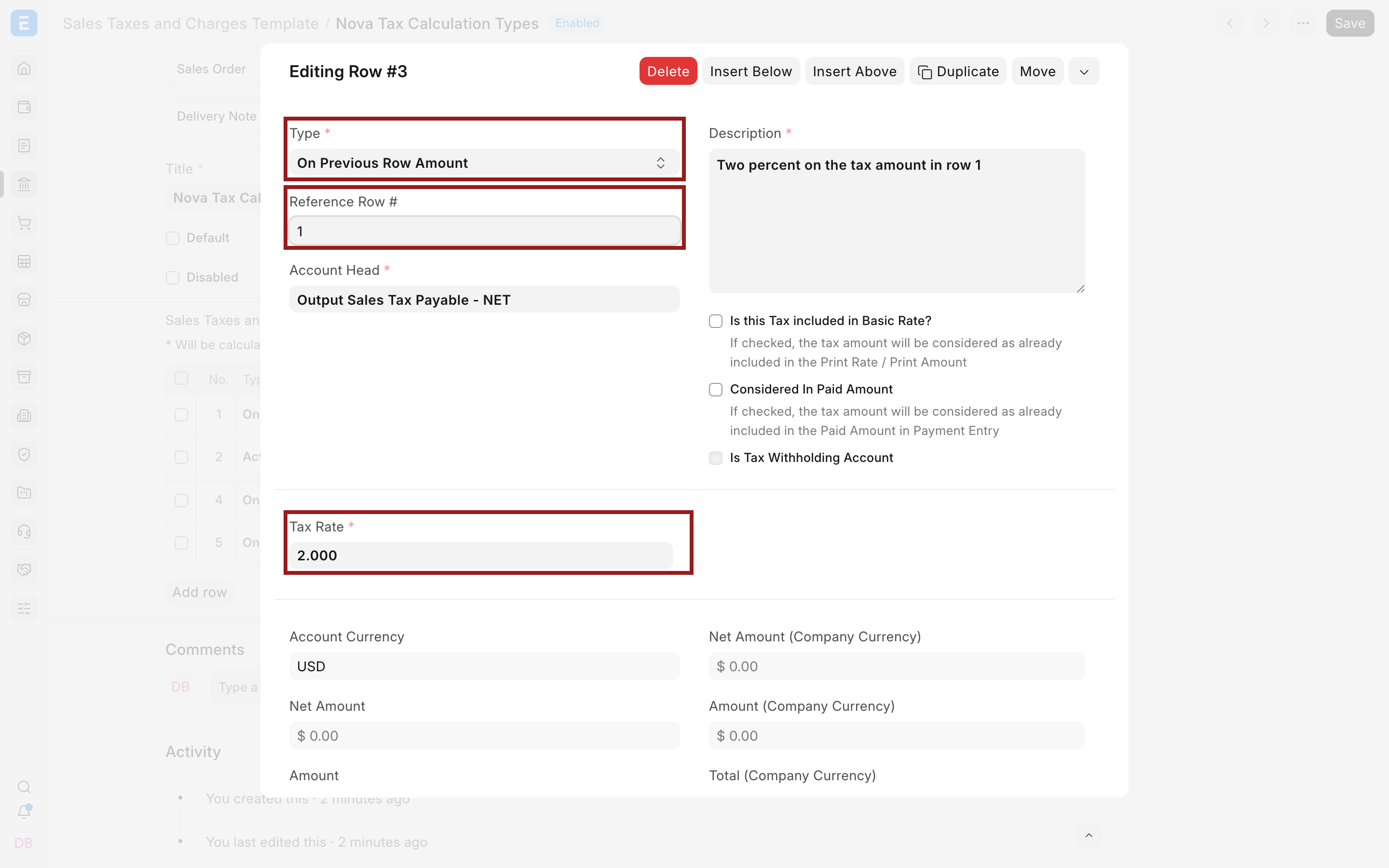
Reference Row # is positional. If you insert, delete, or move rows, recheck the number. A row that still refers to 1 may silently use the wrong base after the template order changes.
Apply and verify the calculation
Select the template on a draft Sales Invoice or another supported transaction. Use simple item values for the first test.
In the current example, the tax table shows:
- Row 1 Amount: $80.00.
- Row 2 Net Amount: $80.00.
- Row 2 Amount: $1.60.
- Total Taxes and Charges: $81.60.
- Grand Total: $1,081.60.
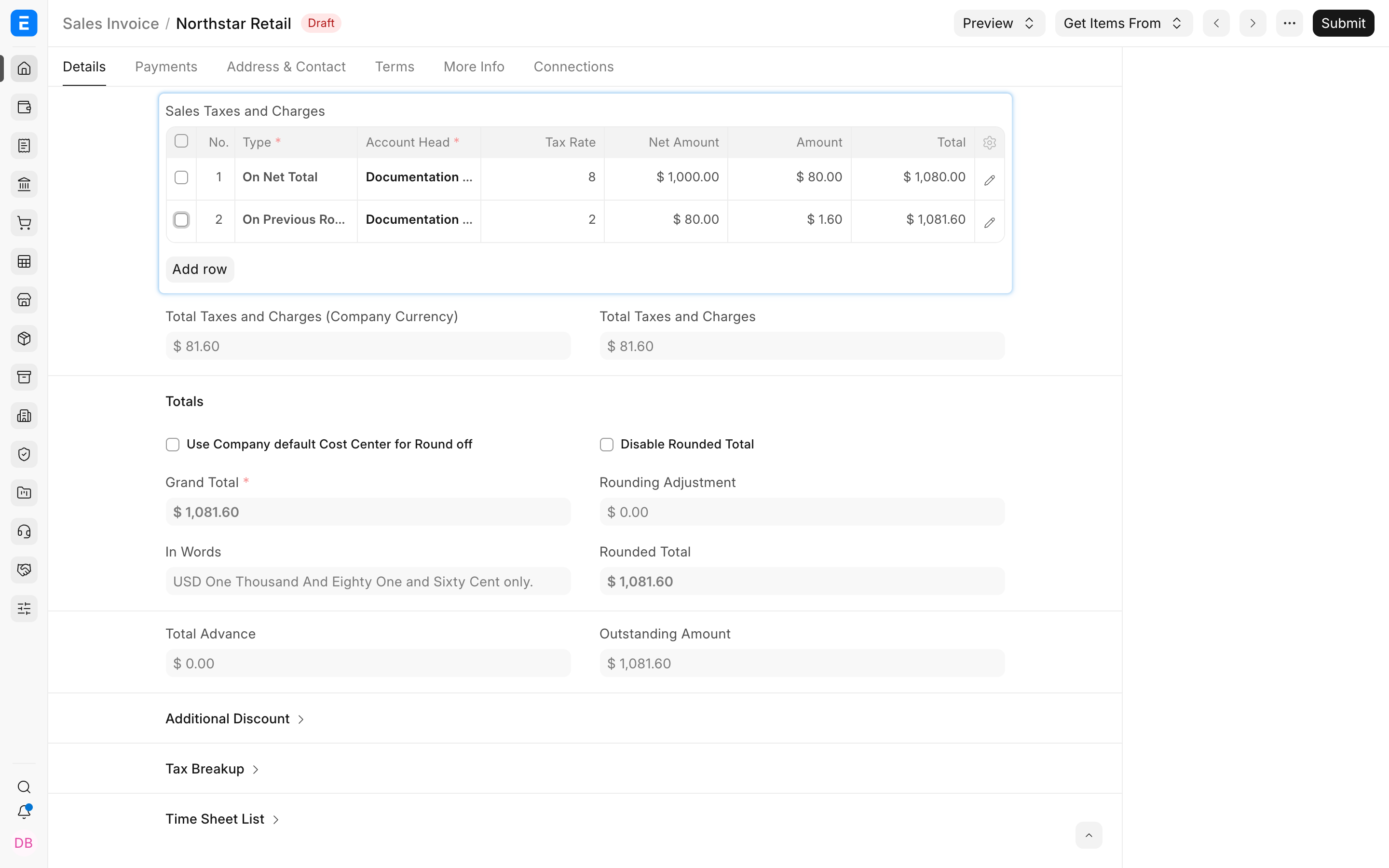
Check the Net Amount, Amount, and Total columns rather than looking only at Grand Total. The row 2 Net Amount should equal the earlier row's Amount.
After submitting a controlled example, review the accounting ledger. Confirm that the two tax amounts post to their intended accounts and that the customer or supplier balance equals the document total.
Previous Row Amount versus Previous Row Total
These settings sound similar but produce very different results.
| Setting for row 2 | Calculation base | At 2% | Final total |
|---|---|---|---|
| On Previous Row Amount | Row 1 Amount: $80 | $1.60 | $1,081.60 |
| On Previous Row Total | Row 1 Total: $1,080 | $21.60 | $1,101.60 |
Use Previous Row Amount only when the rule says the second tax applies to another tax or charge itself. Use Previous Row Total when the rule says it applies to the subtotal after the earlier row. See Apply Tax on Another Tax or Charge for that workflow.
Use the calculation in reusable templates
A template is useful when the same sequence applies repeatedly. Give it a name that identifies the tax combination and company. Before setting it as a default or selecting it through a Tax Rule, test it with:
- A normal taxable item.
- An exempt or differently taxed item if Item Tax Templates are used.
- A discount, when discounts can change the net base.
- A return or Credit Note when the same tax sequence must reverse.
Do not duplicate the dependent tax in both the reusable template and the transaction manually.
Multiple dependent taxes
More than one later row can reference an earlier row, but each dependent row stores one Reference Row #. Keep the sequence readable and describe the base in each row.
If a rule requires a tax on a combination of several amounts, do not assume Previous Row Amount will combine them. It uses only the Amount of the one referenced row. Model the running-total sequence carefully or confirm the supported setup with an accountant and an ERPNext implementation specialist.
Troubleshooting
The second tax is much larger than expected
Check whether the Type is On Previous Row Total. Change it to On Previous Row Amount only when the calculation should use the earlier tax amount.
ERPNext says the reference row is invalid
The referenced row must come before the dependent row, and Reference Row # is valid only with On Previous Row Amount or On Previous Row Total. Move the rows or correct the Type and reference.
The calculation changed after rows were reordered
Reference Row # stores a row position. Reopen every dependent row and verify its reference after inserting, deleting, duplicating, or moving rows.
The second tax uses the wrong amount for items with special rates
Review the base row's Amount after Item Tax Templates are applied. The dependent row uses the amount ERPNext actually calculates for that referenced row, including item-wise overrides.
Frequently asked questions
Can I use the same Account Head for both rows?
ERPNext configuration may allow some combinations, but separate accounts make different tax liabilities easier to review and reconcile. Follow the required chart-of-accounts design and local reporting rules.
Does Reference Row # refer to a tax template or a document row?
It refers to the numbered tax or charge row in the current table, not an item row and not another template.
Can the reference point to a later row?
- Previous-row calculations depend on a row that has already been calculated, so the referenced row must come earlier.
Does this calculation work on purchases too?
Yes, the previous-row calculation types are available in purchase tax rows. On purchases, also choose whether the calculated amount affects Total, Valuation, or both.
Why does the dependent row show a Net Amount of $80?
For On Previous Row Amount, Net Amount represents the calculation base taken from the referenced row. In this example, the base tax Amount is $80.